Practice!B4
Choose 3, 4 or 6 in the workbook dropdown. This is the first receipt’s month, not its amount.

Your cash-flow model. A receipt arrives late.
You’re updating a development appraisal in Excel. Move a sales receipt, trace the formulas it feeds and check that the model responds correctly.
Begin the Excel lesson Real .xlsx practice file · Excel for Windows guidanceFollow the example → try the task → check your reasoning → explore a Companion follow-up.
This preview demonstrates the learning format. The exercises and feedback are authored; no live AI session. Your place is saved on this browser only.
Show me the question and answer first How the Course worksOriginal Propfessor teaching aid · .xlsx · No macros Fictional project · Not a client model
Your manager has moved one £600,000 sales receipt from month 3 to month 6. The appraisal still shows a £200,000 pre-finance surplus. Your job is to check the spreadsheet before reporting what changed.
Open the Practice sheet. B4 controls the first receipt’s month. Keep the Base sheet unchanged so you can compare results.
You can change a timing input, follow it through an Excel formula and explain why a cash-flow output changes.
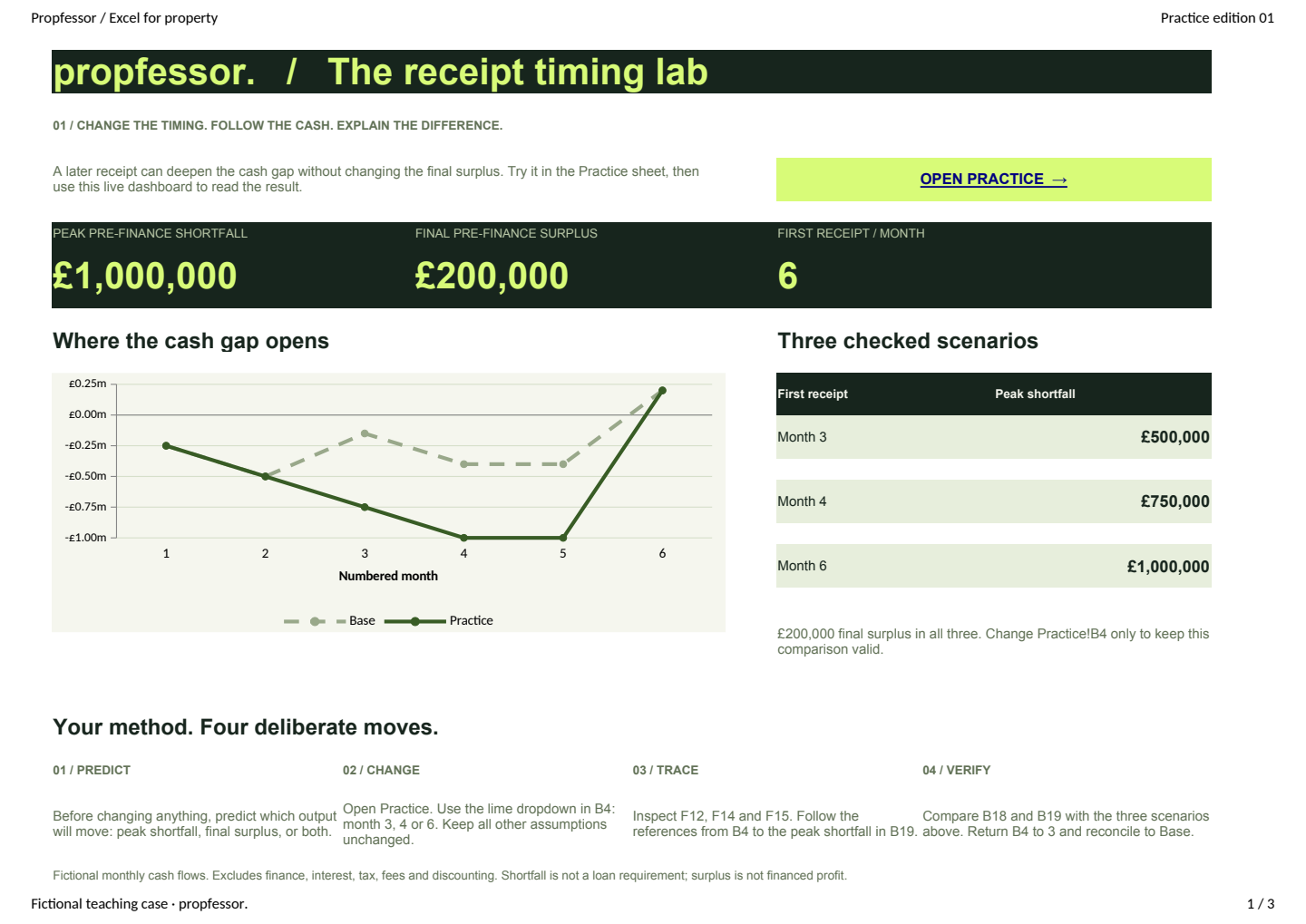
Three sheets. One clear task. Change the receipt month, compare the live chart and trace the result back to its formula.
Open your workbookTry the comparison here, then repeat it in Excel. The website does not edit your downloaded file.
Choose 3, 4 or 6 in the workbook dropdown. This is the first receipt’s month, not its amount.
Select the month 4 receipts cell. In Excel for Windows, use Formulas → Formula Auditing → Trace Precedents to see its input links.
Compare the peak shortfall with this page: £500k, £750k or £1m. B18, the final surplus, stays at £200k.
=IF(F$11=$B$4,$B$5,0)+IF(F$11=6,$B$6,0)F$11 is the column’s month. $B$4 is the selected receipt month. $B$5 is the first amount; $B$6 is the other receipt, fixed in month 6.
F12ReceiptsF14Net cashF15Cumulative cashB19Peak shortfallIf your Excel edition has different controls, inspect these references in the formula bar.
Month-end balance · Starting cash £0
Below zero: cash the project has yet to cover. Lines connect month-end values; they do not show movements within a month.
£600,000
The first of two equal sales receipts.
Costs£250,000 in M1–M4
Other receipt£600,000 in M6
Opening cash£0
Three months later. A £500,000 larger peak shortfall. The same £200,000 final surplus.
Cumulative cash = previous month’s balance + receipts − costs. Peak shortfall is the largest negative month-end balance, shown as a positive amount.
| Cash flow | Month 1 | Month 2 | Month 3 | Month 4 | Month 5 | Month 6 |
|---|---|---|---|---|---|---|
| Costs | £250,000 | £250,000 | £250,000 | £250,000 | £0 | £0 |
| Comparison receipts | £0 | £0 | £0 | £0 | £0 | £1,200,000 |
| Comparison net cash | −£250,000 | −£250,000 | −£250,000 | −£250,000 | £0 | £1,200,000 |
| Comparison cumulative | −£250,000 | −£500,000 | −£750,000 | −£1,000,000 | −£1,000,000 | £200,000 |
| Base cumulative | −£250,000 | −£500,000 | −£150,000 | −£400,000 | −£400,000 | £200,000 |
The browser comparison matches the supplied Excel workbook’s three timing scenarios. It excludes finance, interest, tax, fees and discounting, and nets cash flows within each month. The shortfall is not a loan requirement; the surplus is not a financed profit forecast.
A colleague’s copy uses F$11=3 in the first IF test in F12. You change B4 to 4, but the receipt stays in month 3. What needs fixing?

Look for the missing link.
Does the first IF test read the timing input, or does it always compare the column’s month with the number 3?
Scripted hint · No AI requestThe Course gives you a method. The Companion helps you work through the question in front of you.
The prompts below refer to the Practice sheet you just used. For your own model, include your Excel edition, the cell, its formula and the result you expected.
propfessor.Companion exampleBy the end of month 4, the project has paid £1,000,000 and received nothing. The peak shortfall is £1,000,000, compared with £500,000 in the base case.
Check the monthly cash flow, not only total receipts. The missing £600,000 receipt and the increase in peak shortfall measure different things.
In your copy, set Practice!B4 to 4. Check that F12 is £600,000, B19 is £750,000 and B18 is £200,000. Then explain which formulas connect the input to the shortfall. The page cannot verify work in your local Excel file.
Try a different task in ProcoreThe Course is in development. Create an account for three free Companion questions. No card required.