
Practical lessons in property software.
Try a free lesson in ARGUS Enterprise®, EstateMaster®, Excel and more. Work through a task, make a decision and learn from the feedback.
Course in development · Enrolment and pricing not yet available

Choose your software.
Choose a module and begin a guided sample. No software account needed for browser practice.
13 sample lessons · 13 modules
Excel for property
Trace the receipt. Find the gap.
Change a timing input, follow the formulas and verify the cash shortfall.
ARGUS Enterprise
Reconcile the breakpoint.
Trace the rent components behind a percentage-rent result.
ARGUS Intelligence®
Find the missing contribution.
Separate portfolio membership from the models included in a report.
EstateMaster IA
Read what zero really means.
Diagnose income excluded from a capitalisation calculation.
Rockport VAL
Stress the rent. Keep the base.
Apply a scenario shock without overwriting the starting assumption.
ARGUS® Developer
Put the fee in the right month.
Match cost timing to the obligation behind the line.
EstateMaster DF
Keep the agreed land price fixed.
Choose what varies in a probability analysis—and what should not.
EstateMaster DM
Explain where the forecast went.
See how reforecasting modes respond to the same actual.
EstateMaster CC
Control the reporting version.
Find why a portfolio changes after a fresh project export.
EstateMaster HF
Separate rate from occupancy.
Explain why ADR stays steady while room revenue changes.
Aprao
Find what drives finance cost.
Distinguish Estimated, Cashflow and Override calculations.
AI for property
Catch the unsupported assumption.
Check an AI extraction before a missing value enters your model.
Procore
Diagnose a repeated RFI prefix.
Read the component fields before changing a permanent setting.
No matching sample. Try another software name or clear the filters.
Each module currently has one sample lesson, with pre-written teaching and feedback. Your place is saved on this browser. Full courses, enrolment and pricing are in development.
A workbook you can actually work in.
A live cash-flow dashboard, three receipt scenarios and a formula trail. Change the timing input in Excel and follow the effect all the way to the cash shortfall.
Open the workbook lesson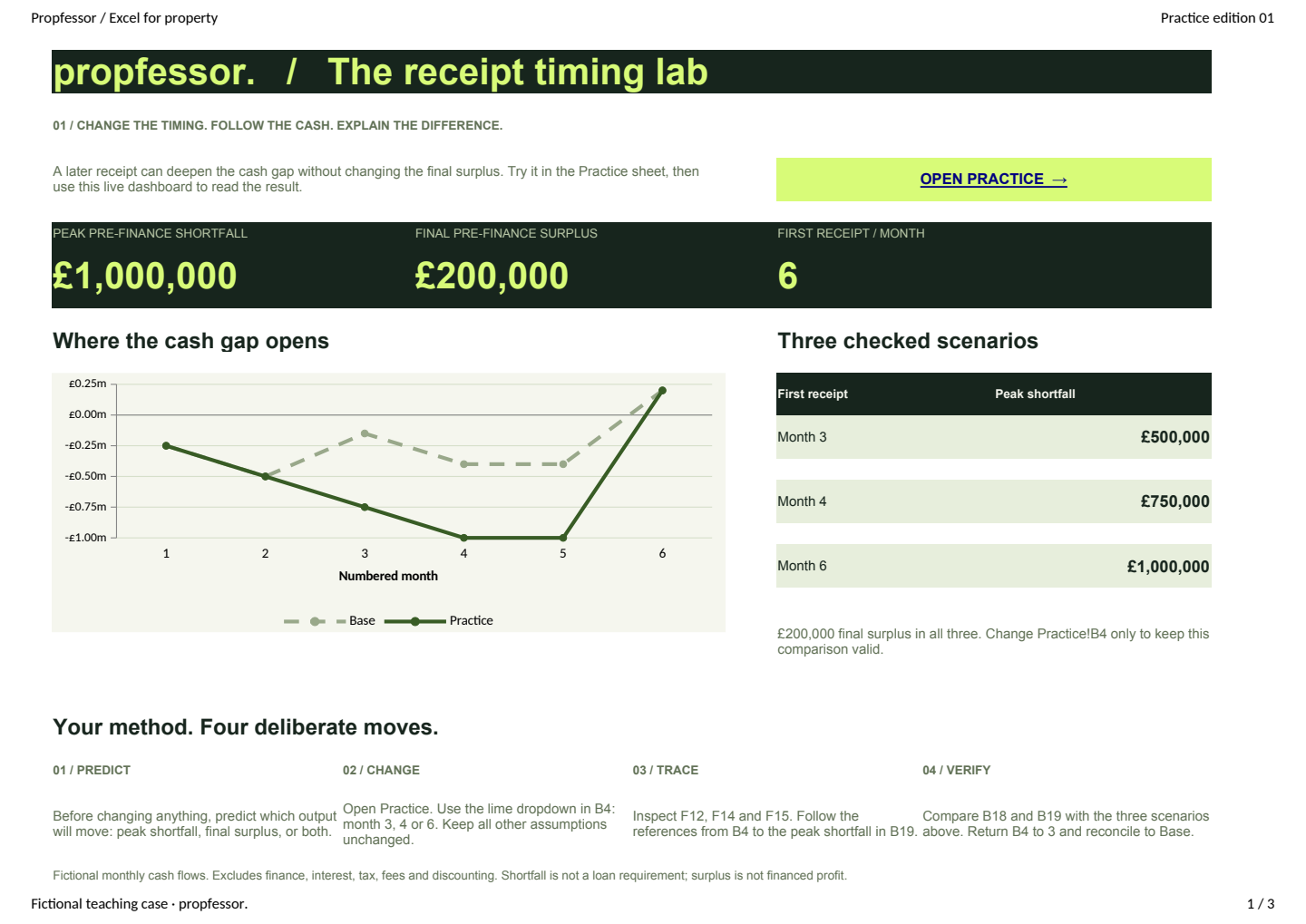
A work problem. A repeatable skill.
Teaching, practice and feedback. You do the work as you learn.
- 01
Understand the task
See what you will learn and why it matters. Read a focused explanation before you start the exercise.
- 02
Practise in context
Follow the explanation and inspect the example. Then try the task in a practice file or your authorised software environment.
- 03
Check your reasoning
Choose what you would do and see why it works. If you are stuck, open a hint and try again.
- 04
Apply it at work
Use the method on a new task. Bring follow-up questions to the Companion with the relevant software and model context.

Judge the training by what someone can do.
Look for a change in capability: can your analyst explain an unexpected result, locate its cause and verify the next step?
Use these previews to evaluate the teaching approach with the people who would take the training. Each sample includes teaching, an exercise and a reasoning check. Full curricula and team administration are still in development.
A useful way to evaluate the samples
- Before: ask how they would investigate the problem, without showing the answer.
- During: try the lesson, the practice and a wrong answer. Does the feedback explain the reasoning?
- After: change the example. Can they explain what would happen and what they would inspect next?
For the Excel sample, move the first receipt to month 4. Ask them to trace it to the £750,000 peak shortfall, then explain why the final surplus is still £200,000.
Preview now. Enrolment comes later.
Companion
Three free questions after sign-up. Monthly Companion subscriptions are available per module. Full courses are still in development.
Read the pricingCourse
In development. You can evaluate these sample lessons now. The final curriculum, enrolment and price have not been announced.
For teams
Team licensing and administration are not offered in this preview. A Companion subscription is not an offer of Course access or a team training package.
Applied training requires your own licensed software where specified. Propfessor does not supply vendor licences. Credentials and formal assessment are not available.
See what the learner actually does.
Start with a sample task, try the check and read the feedback.